End-to-end outreach workflow




Table of Contents
There’s no shortage of advice on how long your email subject lines should be. It varies widely depending on the user’s platform, device, and factors such as desktop window size.
But thinking about email subject line length raises even more questions: how many characters can be shown before a client truncates, and how many characters should you use to actually get opens?
These are related but two very different things.
The other thing this misses is that the words you use in a subject line (long or short) have a huge impact on engagement.
This post aims to answer all of them for you and provides a free tool to check your email subject line length against best practices and visual constraints.
Email Subject Line Length Tool
Here is the interactive tool for email subject line length based on usage research from our testing.
But a tool is nothing without understanding how and why it works. Next, we’ll get into the character limits per platform.
Email Subject Line Character Limits by Platform
Before you can write a subject line that gets opened, you need to know whether it’ll even be read in full.
The numbers below come from real device testing conducted on an iPhone 14, iPad (10th gen), Google Pixel 7, Samsung S22 Ultra, and standard desktop browsers at a width of 1400px.
BuzzStream also added our own tests on iPhone 15, 15 Pro, Google Pixel 10, and Samsung Galaxy S21, and iPad Pro 11-inch to the overall findings.
Here are the email subject line character limits for Gmail:
Gmail
| Device | Character limit |
|---|---|
| Desktop (browser) | 60–70 chars (varies by window width) |
| Tablet (iPad, Gmail app) | 39 chars (up to 78 for full screen) |
| Mobile (iPhone, Gmail app) | 37 chars |
| Mobile (iPhone Pro, Gmail app) | 40 chars |
| Mobile (Android, Gmail app) | 37 chars |
Gmail is the most widely used email client, and although we don’t know which platform journalists use, BuzzStream’s data show that Gmail addresses are the most frequently used domain type in digital PR outreach.
That makes desktop Gmail your most important viewport to optimize for.
Next are the character limits for Microsoft 365 aka Outlook:
Microsoft 365 (Outlook)
| Device | Character limit |
|---|---|
| Desktop (browser) | 50–60 chars (varies by window width) |
| Tablet (iPad, Outlook app) | 45 chars |
| Mobile (iPhone, Outlook app) | 38 chars |
Outlook’s desktop view shows notably fewer characters than Gmail at the same screen width.
Outlook reserves more horizontal space for its action button panel.
If your contacts skew toward corporate email addresses, this may matter more than it might appear.
Last are the Apple Mail email subject line character limits:
| Device | Character limit |
|---|---|
| Desktop (macOS Mail) | 60–70 chars (varies by window width) |
| Tablet (iPad, Apple Mail) | 31 chars |
| Mobile (iPhone 14, Apple Mail) | 48 chars |
Apple Mail on iPhone is the most generous of the three mobile clients, showing around 48 characters.
One thing worth noting: Apple Mail on iPad actually shows fewer characters than on iPhone, because the iPad uses a split-pane layout that allocates less width to the inbox list.
The Safest Universal Length is >40 characters
If you want your subject line to show in full across every device and client listed above, you need to stay under 33 characters, which is roughly five words.
But that’s a very tight constraint that would sacrifice most of your message.
The more practical approach is to front-load the important information within the first 40 characters, so the hook lands even when the rest gets cut.
But a viewable character count is one thing; getting them to click is another.
So, let’s next look at some data from our subject-line study of over 6 million emails.
What Actually Gets Journalists to Open: BuzzStream Data
The character limits above tell you what can be seen.
This next question is harder: within those constraints, what works?
BuzzStream analyzed over 6 million email subject lines sent through the platform as part of digital PR campaigns. The results challenge some widely repeated advice.
Subject lines in the 9–13 word range had the highest open rate
Subject lines in the 9–13-word range had the highest open rate at 40.20%, and the 14–30-word range was close behind at 39.97%.
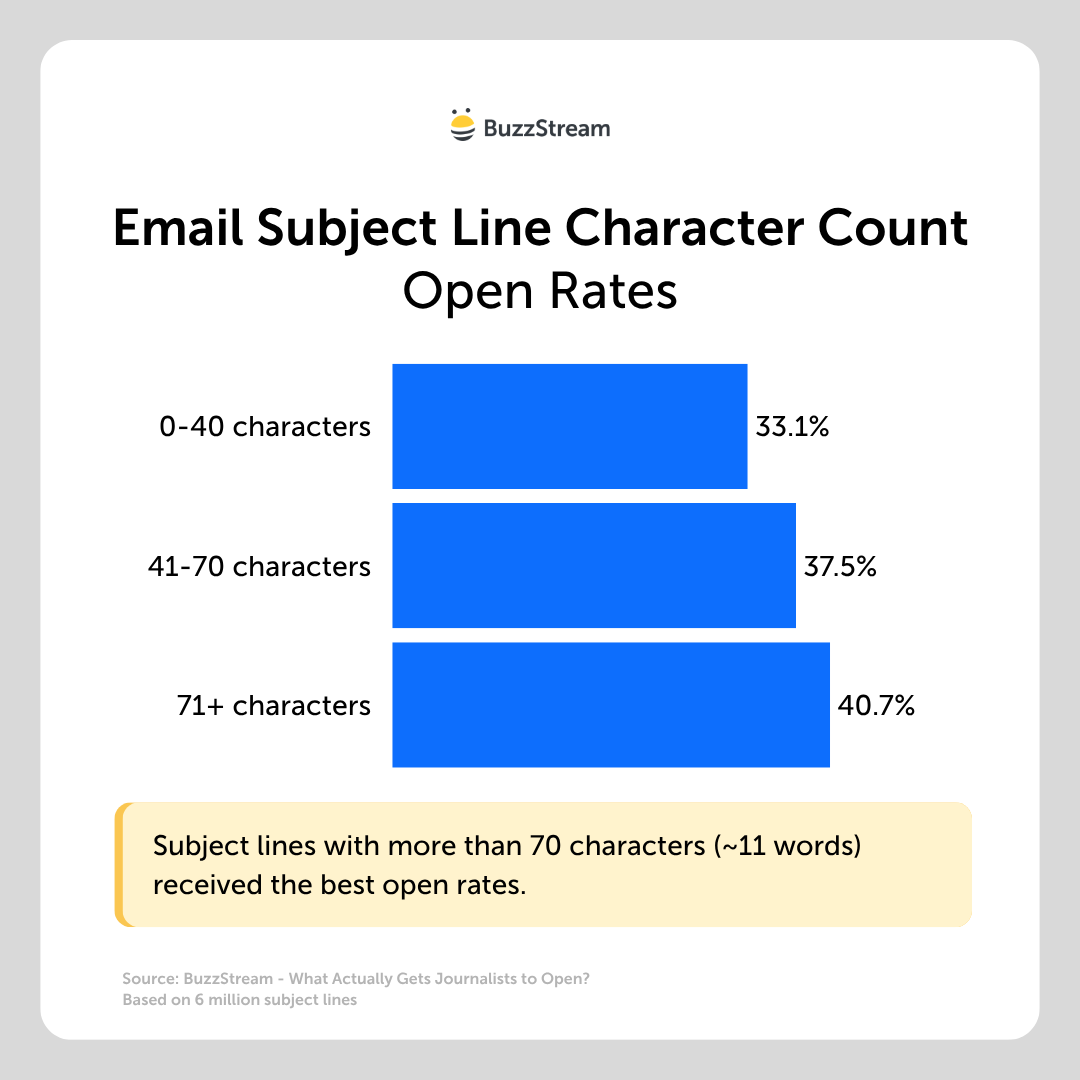
More pointedly: subject lines over 71 characters had the highest open rate of any length bracket, at 40.71%.
You have to consider that most journalists use desktops to read their emails.
But the takeaway isn’t “write longer subject lines.” It’s not all about length.
The words you use and how you use them seem to have the biggest impact.
The opening words carry disproportionate weight
Structure matters as much as length.
In our study, subject lines that led with brackets, such as [Expert Quote], had the highest open rate of any structural format at 52.08%, with a reply rate of 2.24%.
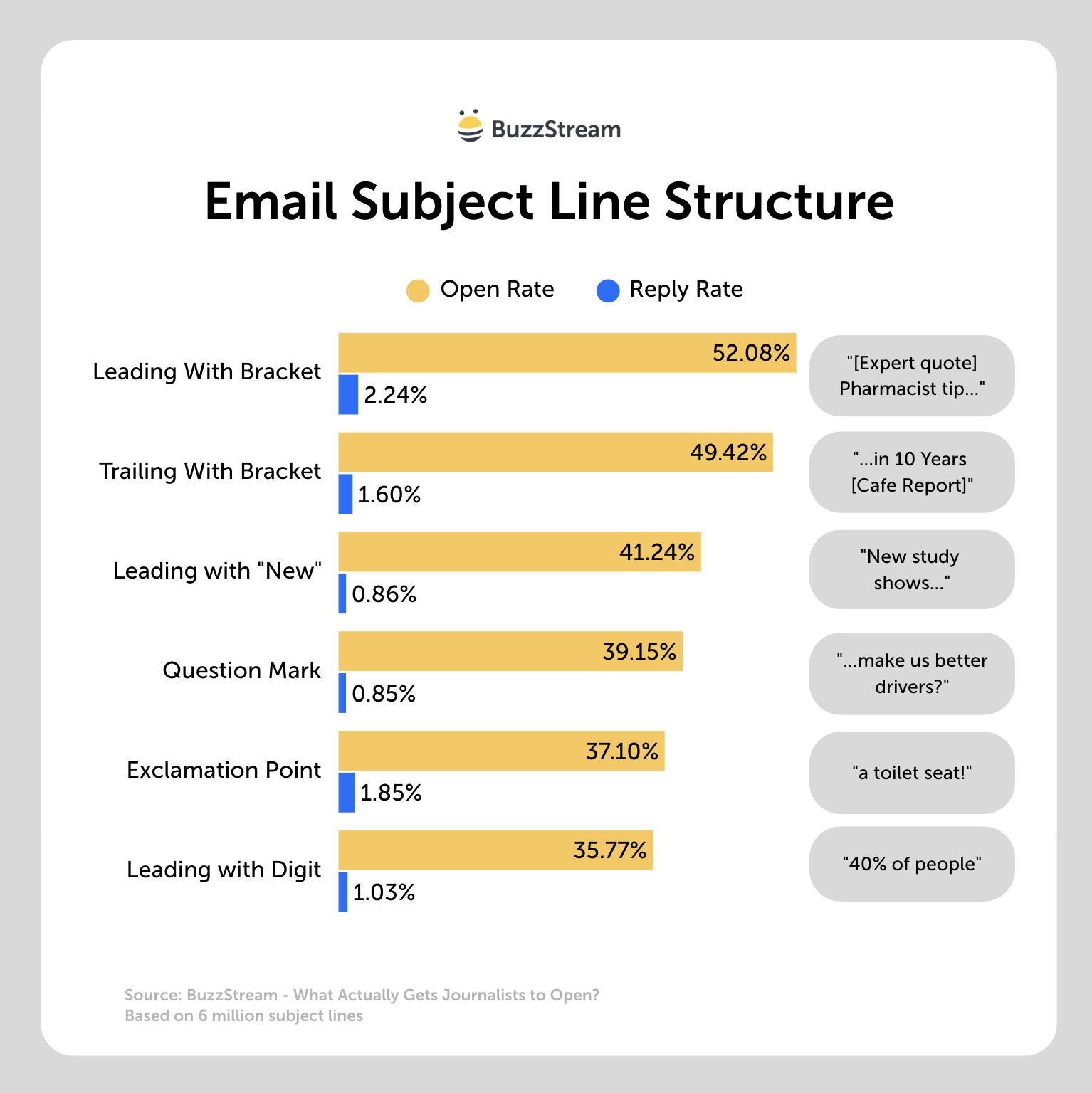
Even trailing brackets performed well (49.42% open rate).
The brackets may function as a visual pattern interrupt in a crowded inbox.
“Study finds” as an opening phrase achieved close to a 41% open rate with a 1.25% reply rate, which is the best-performing phrase pattern in the data.
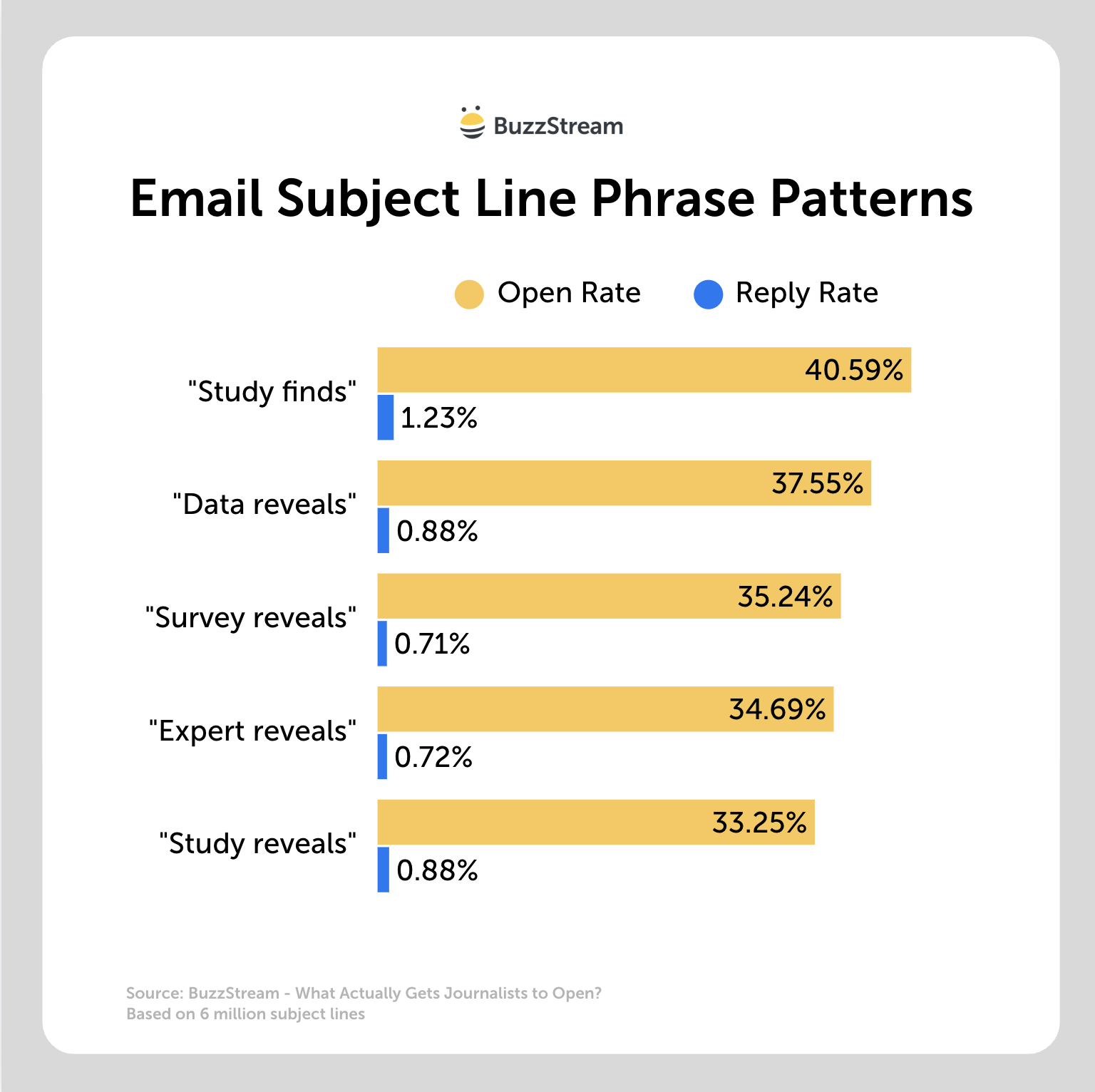
“Data reveals” came second at 37.55%.
Both signal that you have something concrete to offer, which is what journalists are looking for.
Personalization using journalist names hurts more than it helps
This one surprises most people. Using a journalist’s first name in the subject line negatively impacted performance in our data.
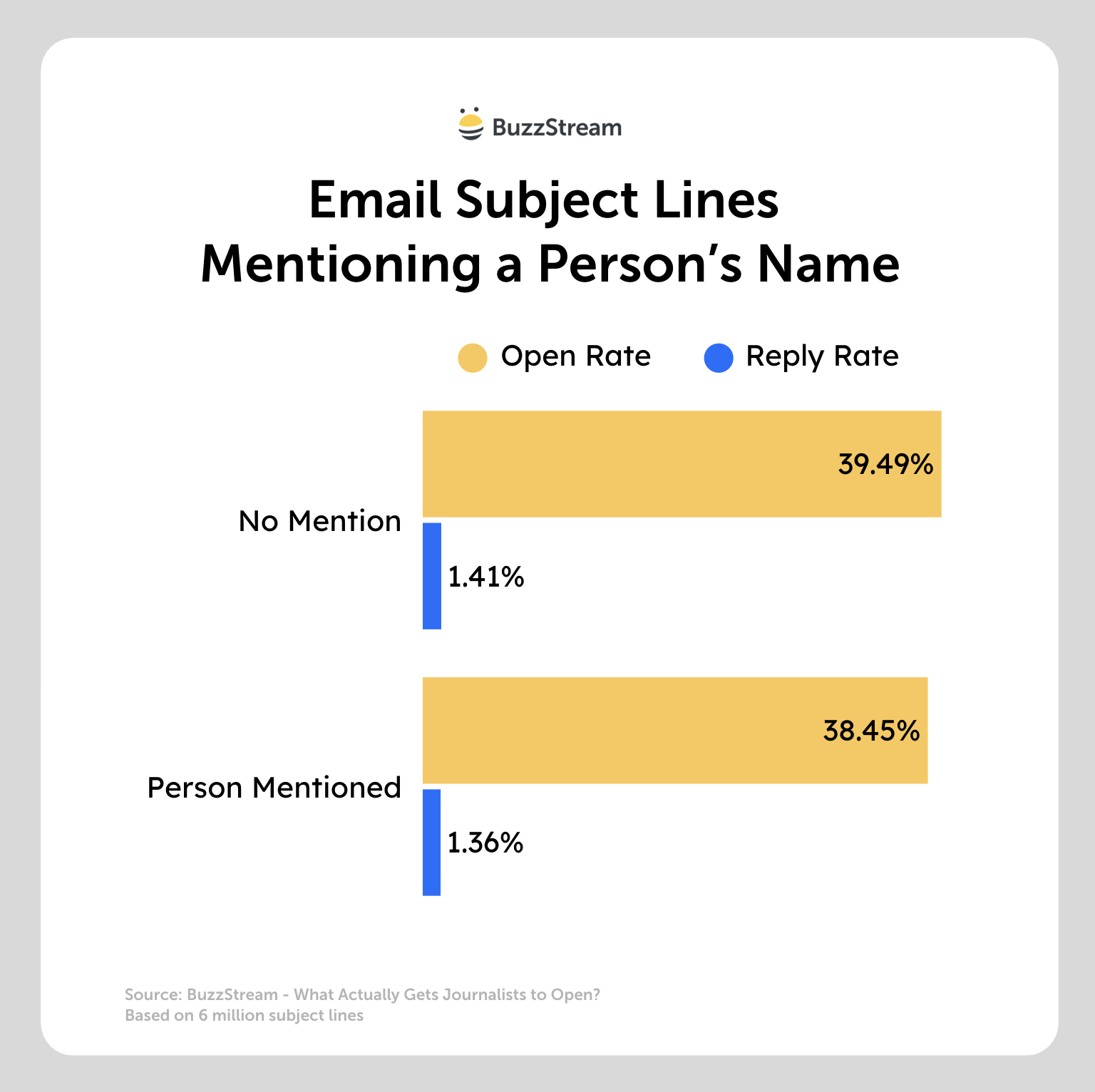
The reason is likely that name-based personalization has become so overused in outreach that it reads as a template signal the opposite of what you’re going for.
What works instead is relevance to the beat.
A subject line that matches exactly what that journalist covers performs better.
Title case outperforms sentence case
Subject lines written in title case, like “New Study Reveals Best Time to Pitch” rather than “New study reveals best time to pitch”, had higher open rates in the data.
Higher reading-level language (10th grade and above) also correlated with better performance. Both likely reflect the norms of the journalism world your outreach is targeting.
The Bottom Line Before Sending
The data points to a specific profile for high-performing digital PR subject lines: title case, 9–13 words, leading with a bracket or a data-forward phrase like “Study finds,” front-loaded with the most compelling hook, and written for desktop Gmail.
That’s not a rigid formula — but it’s a starting point grounded in 6 million real sends rather than conventional wisdom.
Use the preview tool above to see exactly how your subject line renders across Gmail, Microsoft 365, and Apple Mail before you hit send.


 Check out the BuzzStream Podcast