 End-to-end outreach workflow



Table of Contents
- Authenticate your domain with SPF, DKIM, and DMARC.
- Use an established sending domain whenever possible.
- Build and protect your sender reputation over time.
- Keep spam complaints as close to zero as possible.
- Enable one-click unsubscribe to reduce spam reports.
- Verify and clean your email list before every campaign.
- Don’t blast emails all at once.
- Send fewer, more relevant emails to highly targeted recipients.
- Write subject lines people actually want to click.
When I first started out in digital PR and link building, I thought the Wall Street Journal would link to my infographic on candy-flavored shot recipes I wrote for a bartending school.
I remember finding the email address, crafting a personalized email, sending it, and then confidently waiting for a reply.
Not only did my email not get a reply, but (unsurprisingly) it didn’t even get an open.
Looking back, it’s easy to point to obvious reasons why this didn’t work.
But people run into this scenario every day.
It’s one of the top problems that BuzzStream customers run into. Unfortunately, there’s rarely a single change that can solve a campaign.
In this post, I’m going to lay out the biggest factors based on studies we’ve done and how to increase your open rates.
A Quick Note on Open Rates
Open rate is a useful signal, but it’s a messy one.
In my mind, relative comparisons are more useful than the absolute rates.
1. Set up SPF, DKIM, and DMARC Correctly
- Impact: High
- Effort: Low — a couple of hours, then done
SPF, DKIM, and DMARC are three authentication standards that prove to Gmail and Outlook that your email is indeed from you.
In a study across 1,785 domains and 14.3 million emails, just 1 in 10 (11%) of sending domains for BuzzStream users were fully authenticated.
And when I compared open rates for those with no authentication to those with at least one record in place, open rates were four times lower for those without:
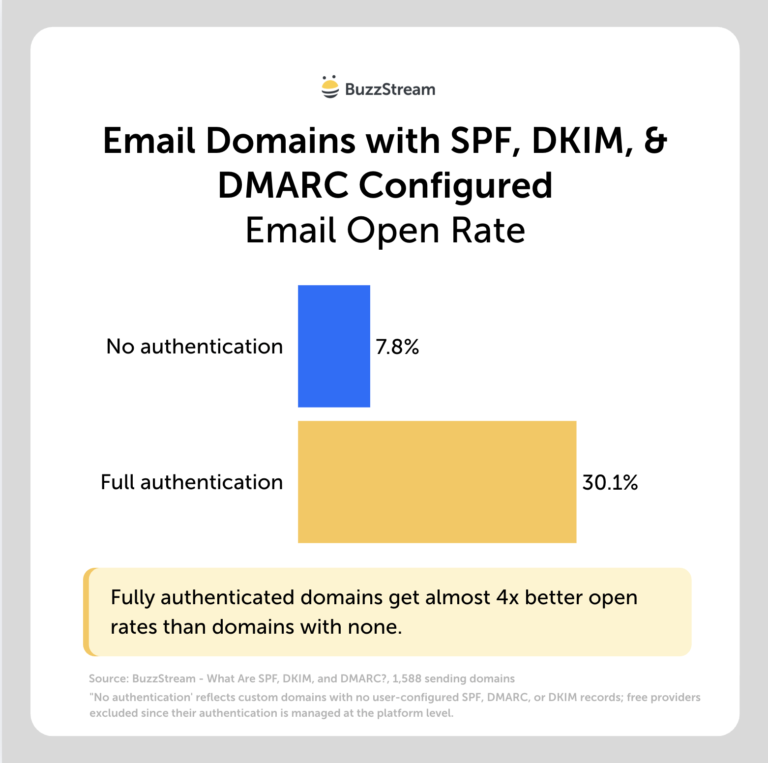
That’s a roughly 4x difference (though note the second group is a low bar—”at least one record” isn’t the same as fully configured).
As the first of many caveats, this is correlational, and people who bother to set up authentication tend to be more careful senders in general, so we can’t pin the whole gap on the records themselves.
But there’s no slice of the data where having nothing configured beats having something.
It’s also table stakes now.
In 2024, to combat email spam, Google and Yahoo announced new requirements for bulk senders (those sending more than 5,000 emails per day), including the requirement for SPF, DKIM, and DMARC authentication.
Later, Microsoft announced the same requirements.
How to get started
- ✓ Check your authentication with our free email deliverability checker.
- ✓ SPF: Use ~all for domains that send email
- ✓ DKIM: turn on signing through your provider (Google Workspace, Microsoft 365, etc.).
- ✓ DMARC: start at p=none with a reporting address so you can see what’s passing before you enforce.
2. Build Your Domain Age
- Impact: High
- Effort: High — patience, months of consistent sending
Even with perfect authentication, inbox providers seem to look at domain age.
In research we did across 1,785 domains and 14.3 million emails in our domain age study, we found that older domains had better open rates.
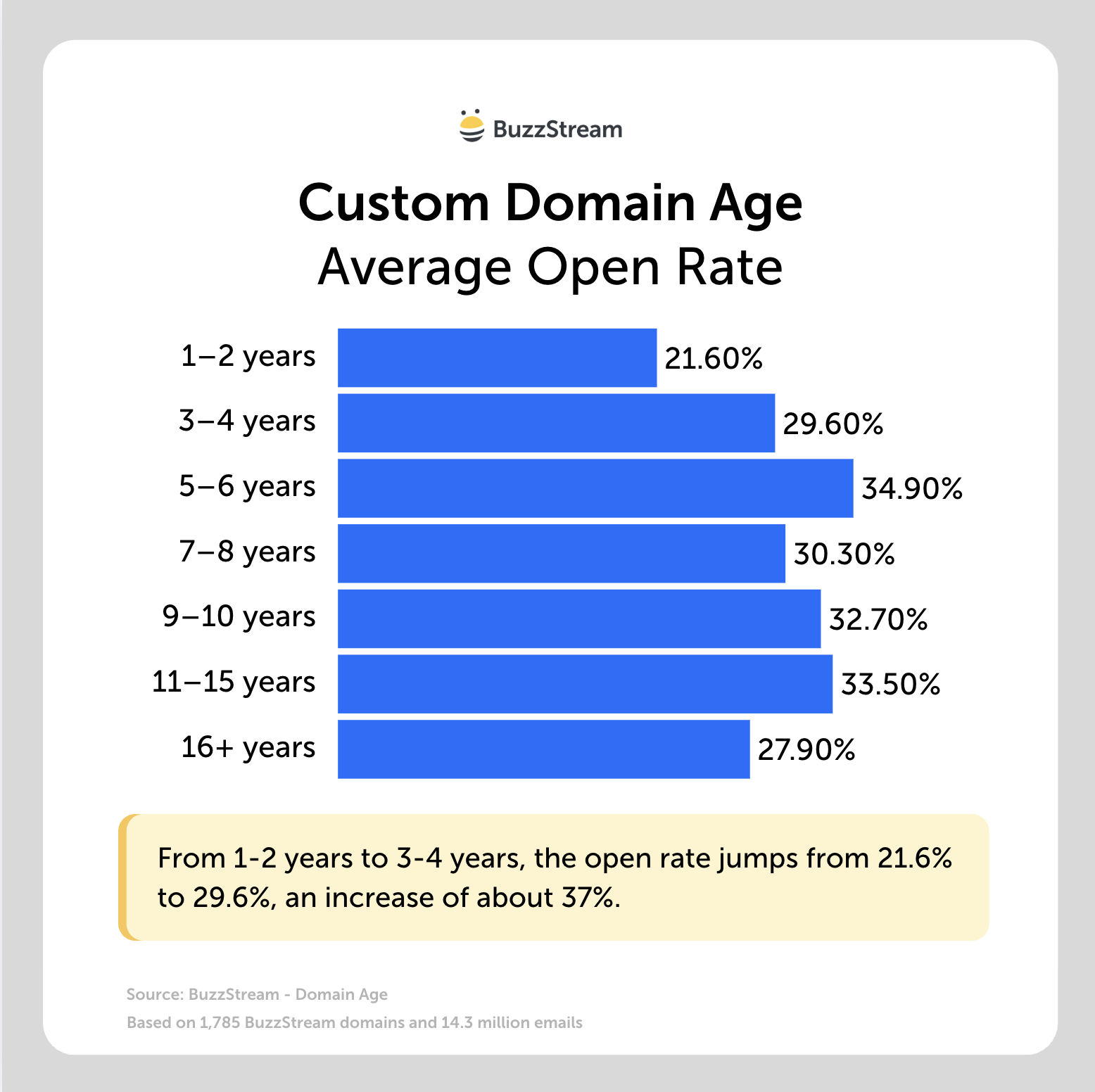
And for this one, I tested two obvious alternative explanations: sender experience and authentication.
Seasoned agencies and brand-new solo senders on young domains opened at roughly the same rate (25.3% each).
So it doesn’t look like experienced senders have any advantage on young domains.
And even among fully authenticated domains, the newest still opened at a lower rate (17.9%) than the oldest (27.9%).
Again, this is correlational data, and while that rules out two likely explanations, it’s not proof.
Performance did not rise consistently across all age brackets, so domain age should maybe be treated as more of a risk indicator rather than a predictable scoring factor.
Either way, the results suggest that very young domains may face a disadvantage.
How to get started
- ✓ Unfortunately, there is no one fix. Maintaining best practices over time can fix it.
- ✓ Don’t spin up a fresh domain right before a big campaign.
- ✓ Start slow, send to people who engage, build history before you scale.
3. Improve Your Sender Reputation
- Impact: High
- Effort: High — slow to build, slow to repair
Reputation is a score inbox providers keep on you over time.
No provider shares the makeup of these scores (to prevent spammers from reverse engineering it), but most agree that the big three that go into it are:
- email engagement
- spam complaints
- bounce rates
Basically, if you are a nuisance when emailing, you will get a poor reputation.
Unfortunately, there are no solid studies showing that a poor sender reputation directly affects open rates, largely because so many variables are involved.
But I can tell you that one study from Mailjet found that 70% don’t use any service to monitor their sender reputation.
So, even though it’s very impactful, many people seem to ignore it.
There are several tools you can use to monitor your reputation, like Google’s Postmaster Tools (if you use Gmail).
It can look something like this:
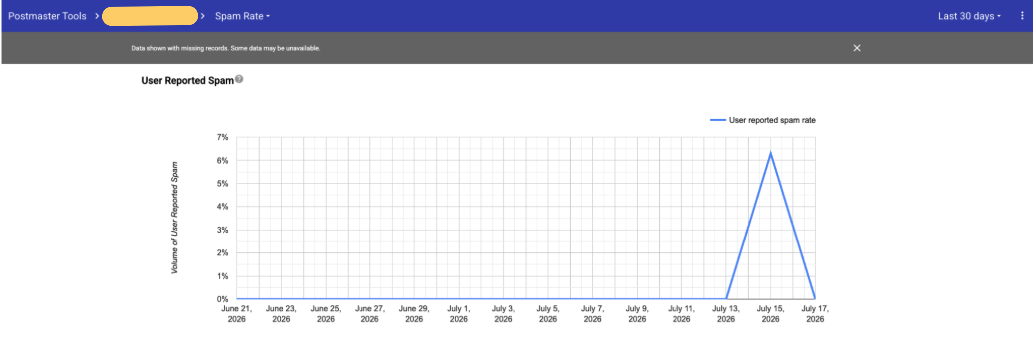
You can also try a third-party tool like Validity’s Sender Score, which gives you a score based on your IP address, calculated from a 30-day window of data pulled from other mailbox and security providers.
It pulls metrics such as complaint rates, unknown-user rates, spam-trap hits, and sender-volume consistency.
How to get started
- ✓ Start by monitoring your sender reputation with a tool.
- ✓ Fix the inputs below (complaints, hygiene, content, engagement) and reputation follows.
Once that foundation is in place, your sending behavior determines whether your reputation improves or deteriorates.
Spam complaints, bounces, sudden volume spikes, and consistently weak engagement all signal that recipients may not want the emails you are sending.
4. Avoid Spam Filters
- Impact: Very high — rates around 0.3% can trigger enforcement
- Effort: Low to monitor, Medium to fix the causes
Every email I get that is clearly an AI-written cold email offering me guest post emails, I click the spam button.

And while this is obviously spam, others may be even more strict.
In Cision’s State of the Media Report, 77% of journalists surveyed said they would block a PR professional or put them on a “don’t call” list for spamming them with irrelevant pitches.
Technically speaking, Google, Yahoo, and Microsoft all set a hard enforcement threshold of 0.3% for spam complaints from bulk senders (though all three recommend staying under 0.1%).
At a 0.3% rate, 30 complaints per 10,000 delivered messages would reach the stated ceiling.
(Though of course, how providers calculate and enforce that threshold can vary.)
Here are Google’s, Yahoo’s, and Microsoft’s requirements.
How to get started
- ✓ Set up Google Postmaster Tools and check your spam rate.
- ✓ Personalize and target emails carefully to reduce the likelihood that recipients mark them as spam.
- ✓ Give people an easy way out (see the next point) — a one-click unsubscribe is far better for your reputation than a “Report Spam” click.
5. Add One-Click Unsubscribe
- Impact: Moderate — protects reputation more than it lifts opens directly
- Effort: Low — usually a quick setting
There are unsubscribe links and one-click unsubscribe. We should cover both.
Unsubscribe links
First, most unsolicited promotional email needs an opt-out method under the US CAN-SPAM Act, and similar rules exist in the UK/EU (GDPR/ PECR), Canada (CASL), and Australia (Spam Act).
So where does that leave link builders and PRs?
Google says that “The distinction between promotional and transactional messages can vary depending on industry and applicable regulations. Message recipients, not Google, determine the nature of the messages they receive.”
If you are leaning on the spray-and-pray method (which we don’t recommend in 2026, as our study has proven it’s ineffective), you should probably have one, given that it’s an email blast.
If you are creating highly personalized outreach to a small, targeted list of journalists, that’s probably the case where an unsubscribe link is least required because it’s arguably not a “commercial” blast.
Either way, our data has shown that the link, when it appears, does not correlate with lower reply rates.
If you’re a BuzzStream user, follow our help doc for adding an unsubscribe link.
One-click unsubscribe
A newer requirement, however, is the one-click unsubscribe.
Google and Yahoo (Feb 2024) require a visible unsubscribe link in the body for bulk senders (which, again, are those who send 5,000+ emails a day, counted across your whole domain, to personal inboxes).
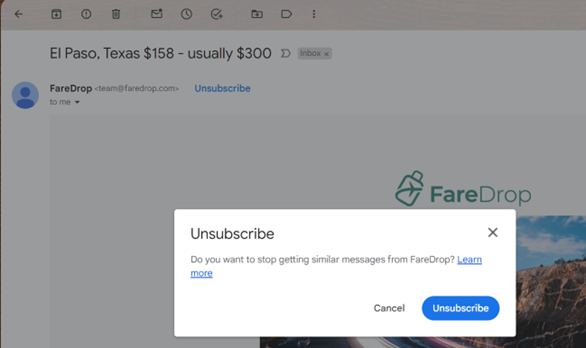
We don’t have data on how this impacts outreach yet, but Google has said, “one-click unsubscribe also helps you maintain a low spam rate, which improves message delivery.
High spam rates negatively affect message delivery for any message type that you send.”
My assessment here is that an unsubscribe barely dents your reputation, whereas a spam complaint is MUCH worse. So, I’d rather someone click unsubscribe.
If you are a BuzzStream user and wish to add a one-click unsubscribe button, contact our help or chat, and we can enable it for you.
(This isn’t legal advice. Determine whether your message is promotional or commercial under the applicable rules. For templated or bulk outreach, include a clear opt-out; for more individualized outreach, check with your legal team rather than assuming personalization creates an exemption.)
How to get started
- ✓ Decide which bucket you’re in: bulk sender → link required; templated blast → include it; small personalized journalist list → likely optional, but harmless to add.
- ✓ If you send anywhere near 5,000/day across your domain, treat one-click unsubscribe as mandatory and check it’s in your headers (in Gmail: “Show original,” look for List-Unsubscribe).
- ✓ Honor opt-outs promptly — within 30 days to stay CAN-SPAM compliant, though sooner is better. The link is worthless if it doesn’t actually work.
6. Send to Active, Verified Recipients
- Impact: High
- Effort: Medium — verify and prune before sending
Sending to invalid, outdated, or unverified addresses raises bounce rates and spam complaints, which drags down the reputation above.
This is one of the main reasons I don’t trust email finder tools that pattern match anymore—especially in digital PR.
We conducted a study of top email finder tools and found that most email lookup tools don’t work for journalist research, with the ones we tested returning correct results only 38% of the time.
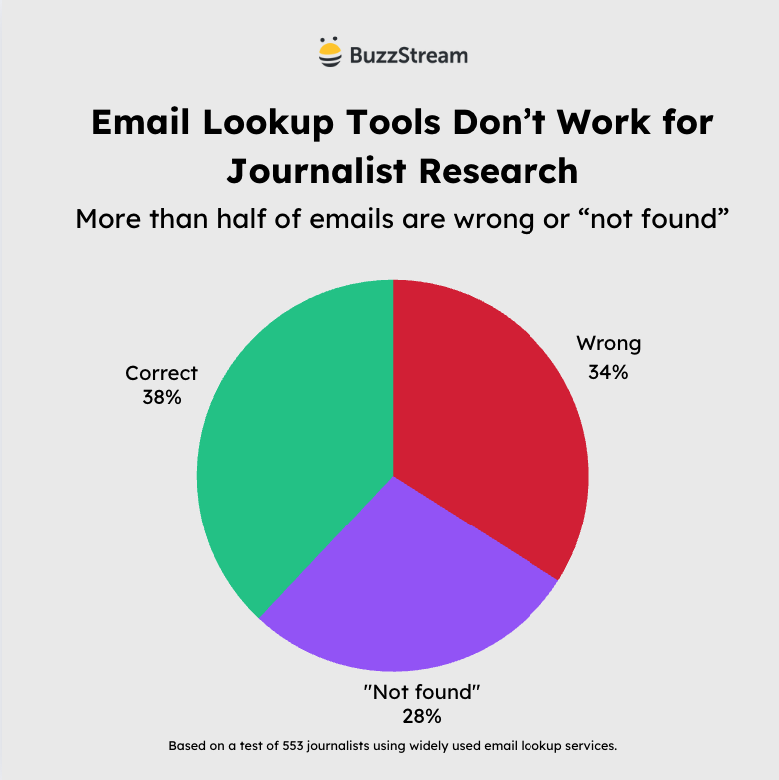
The reason in journalism is mainly due to mergers and acquisitions of publisher sites into larger media companies.
Someone writing on esquire.com actually has a @hearst.com email address—which is something these tools can’t pick up.
Another reason is freelancers and contributors (who make up anywhere from 15% at Journalist Resource to 40% at Pew Research, depending on who you ask) who typically don’t use email addresses associated with the site they are writing on.
Lastly, journalists tend to jump around jobs quite often.
Reuters estimates thousands of journalism jobs have disappeared over the past two years, while Muck Rack found nearly half of journalists have considered leaving the profession due to burnout!
These are the reasons we built ListIQ, our AI-powered media list building tool that helps you build highly relevant lists right from Google News.
It will not only find verified email addresses but also easily check a list of email addresses and tell you whether the journalist is still active at the publication.
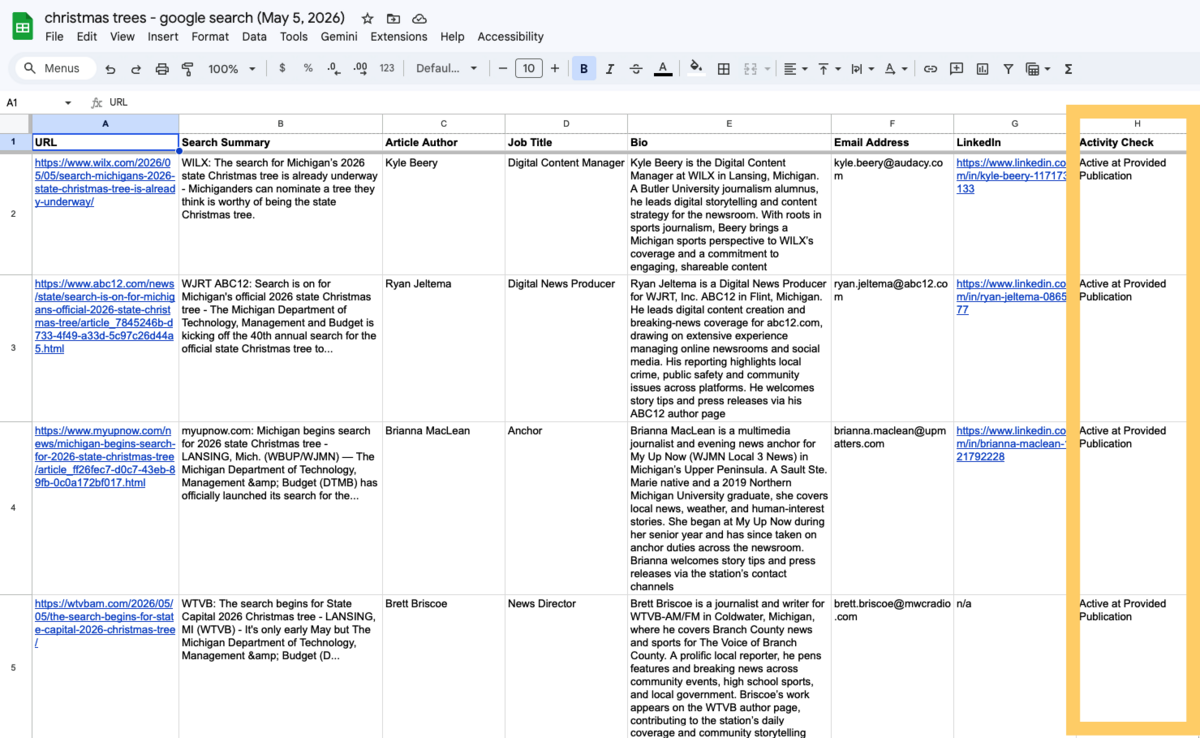
And if you know who is no longer publishing at a publication, you can skip those to avoid excessive bounces.
How to get started
- ✓ Use a verified, targeted list.
- ✓ Use ListIQ to prune dead addresses instead of re-sending to them.
7. Slow Down Your Sending Rate
- Impact: High — can get you outright blocked, not just filtered
- Effort: Low — mostly a settings or strategy change
Inbox providers can see your sending patterns and watch for sudden changes.
If you suddenly start firing out 5,000 emails in a day when you normally send 100 per day, inbox providers may think it’s spam.
We’ve seen senders have their email accounts outright banned by their provider for ramping up volume too aggressively (which I discussed in my webinar on building relevant lists).
[IMAGE: Screenshot — send scheduling ruleset]
This is also why the domain-warming advice from earlier matters: reputation is built through consistent, gradual sending, and a velocity spike is the fastest way to undo it.
BuzzStream has safeguards for bulk senders that let you set a send rate and window.
A send window restricts outreach to the days and hours you choose (say, weekdays 8 am–6 pm in your recipients’ time zone), so nothing fires at a suspicious time.

And a send speed setting lets you spread sending over time to avoid the big bursts that can trigger spam.
How to get started
- ✓ Spread big campaigns across multiple days rather than sending everything at once.
- ✓ On a new or recently quiet domain, ramp up gradually — don’t 10x your daily volume overnight.
- ✓ Set a minimum time between sends.
- ✓ Set the send window so mail only goes out during normal hours.
8. Send to the Right People
- Impact: High
- Effort: Low — send less, but requires discipline
When things aren’t going well, the urge is always to send more.
If you know that 1 in 3 emails gets opened, just send 3x as many and you’ll get more wins, right?
But the data simply doesn’t support it.
We checked 31 million emails, 86,000 campaigns, and as campaigns got bigger, open rates went down:

Campaigns that sent fewer emails also achieved higher reply rates and more links on average.
Targeting is the most likely explanation, but we did not directly measure list relevance, so campaign size may also be acting as a proxy for sender quality, campaign type, or outreach strategy.
Inbox providers like Google are widely believed to incorporate recipient engagement and negative feedback into their reputation and filtering decisions.
When you blast a large, loosely targeted list, most recipients may never engage.
That weak engagement, along with any resulting complaints, is likely to contribute to the reputation problems covered earlier.
Sending more to fix low engagement actually deepens the hole.
So the fix isn’t more volume, but it isn’t just halving your list either.
It’s going smaller and more targeted, so the people who do get your email are more likely to open, reply, and click links.
How to get started
- ✓ We generally recommend capping a single campaign around ~100 truly relevant names.
- ✓ Each angle or segment should probably have no more than 20-30 names.
- ✓ Measure links and coverage, not emails sent. Volume is a vanity metric.
Reaching the inbox only gives you the opportunity to earn an open.
Whether someone actually clicks depends much more on whether they recognize the sender, find the message relevant, and find the subject line compelling enough to warrant their attention.
9. Make Your Subject Lines Click-Worthy
- Impact: Moderate
- Effort: Low
We analyzed over 6 million subject lines from real digital PR campaigns.
Here are some patterns that were associated with higher open rates in the dataset:
Use [brackets]
Leading with a bracket, such as [New Data], had the highest open rate of any format at 52.08%.
Even trailing brackets pulled 49.42%.
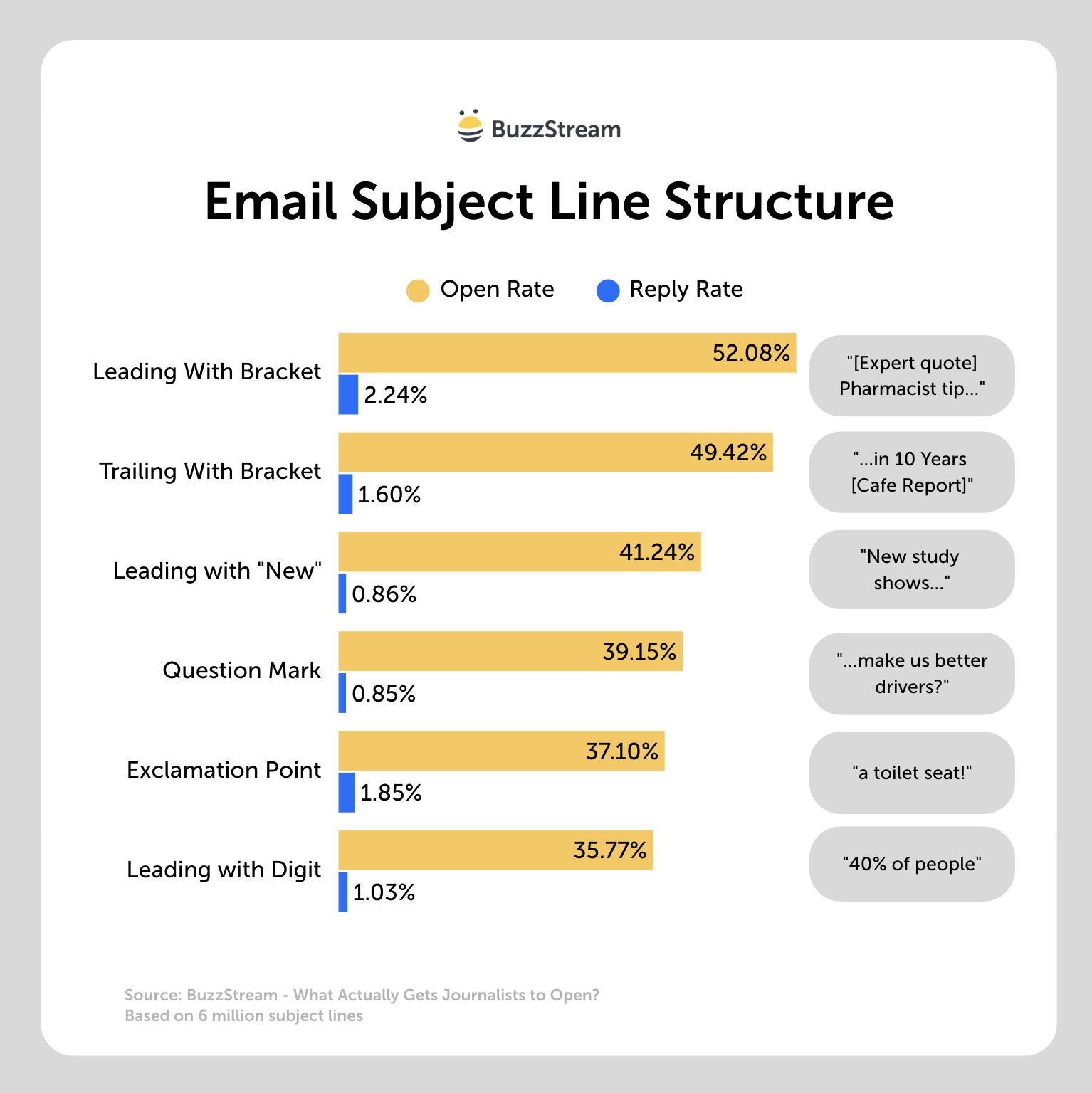
One possible explanation for me is that brackets create a visual pattern interrupt in a crowded inbox.
“Study finds” is your best opening line
Subject lines starting with “Study finds” hit nearly 41% with a 1.25% reply rate, making it the top phrase pattern.
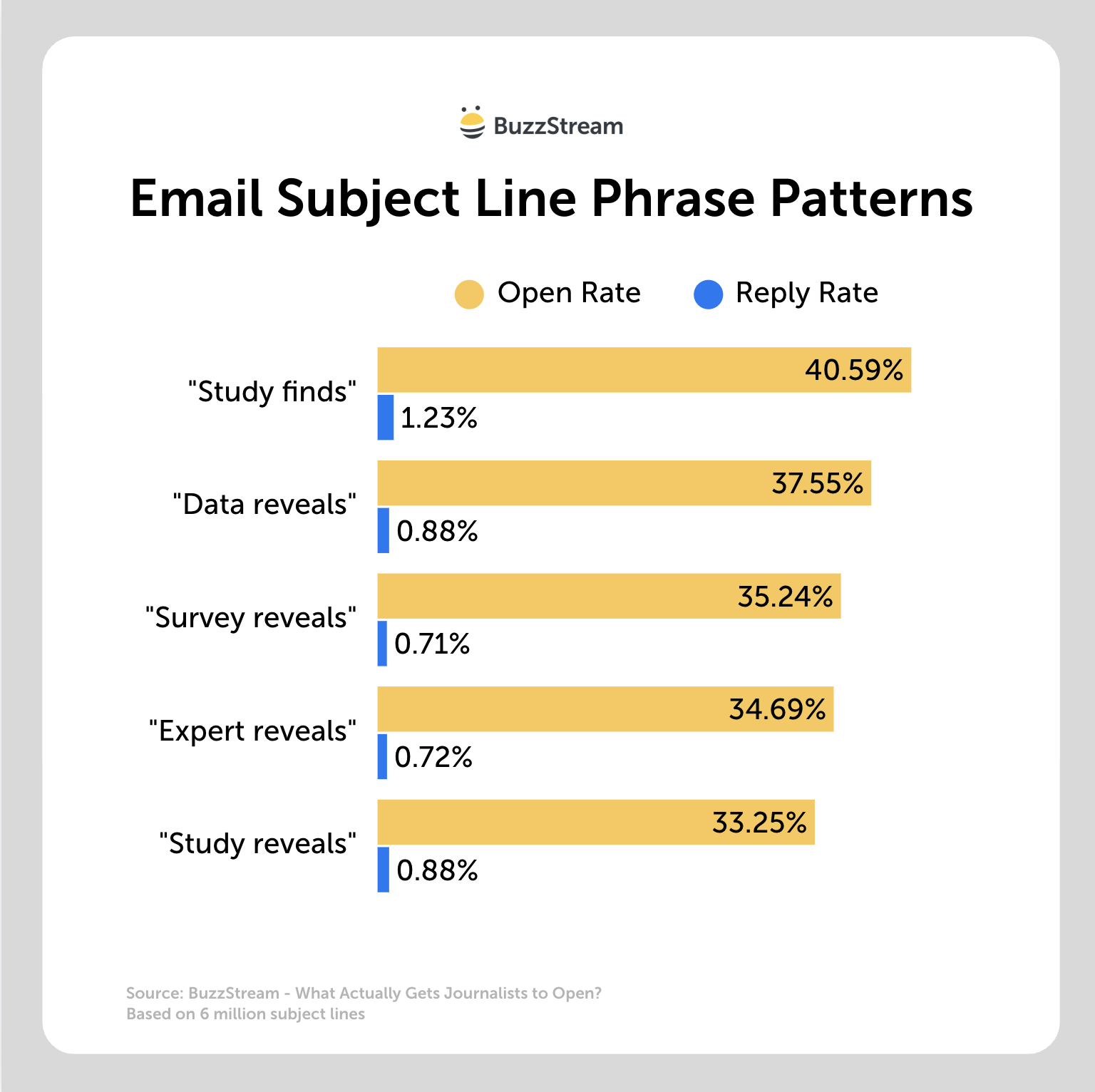
“Data reveals” was second at 37.55%. Both promise something concrete, which is what a journalist scans for.
9–13 words had the best opens
The 9-13 word group won out at 40.20%, but 14–30 words was right behind at 39.97%.
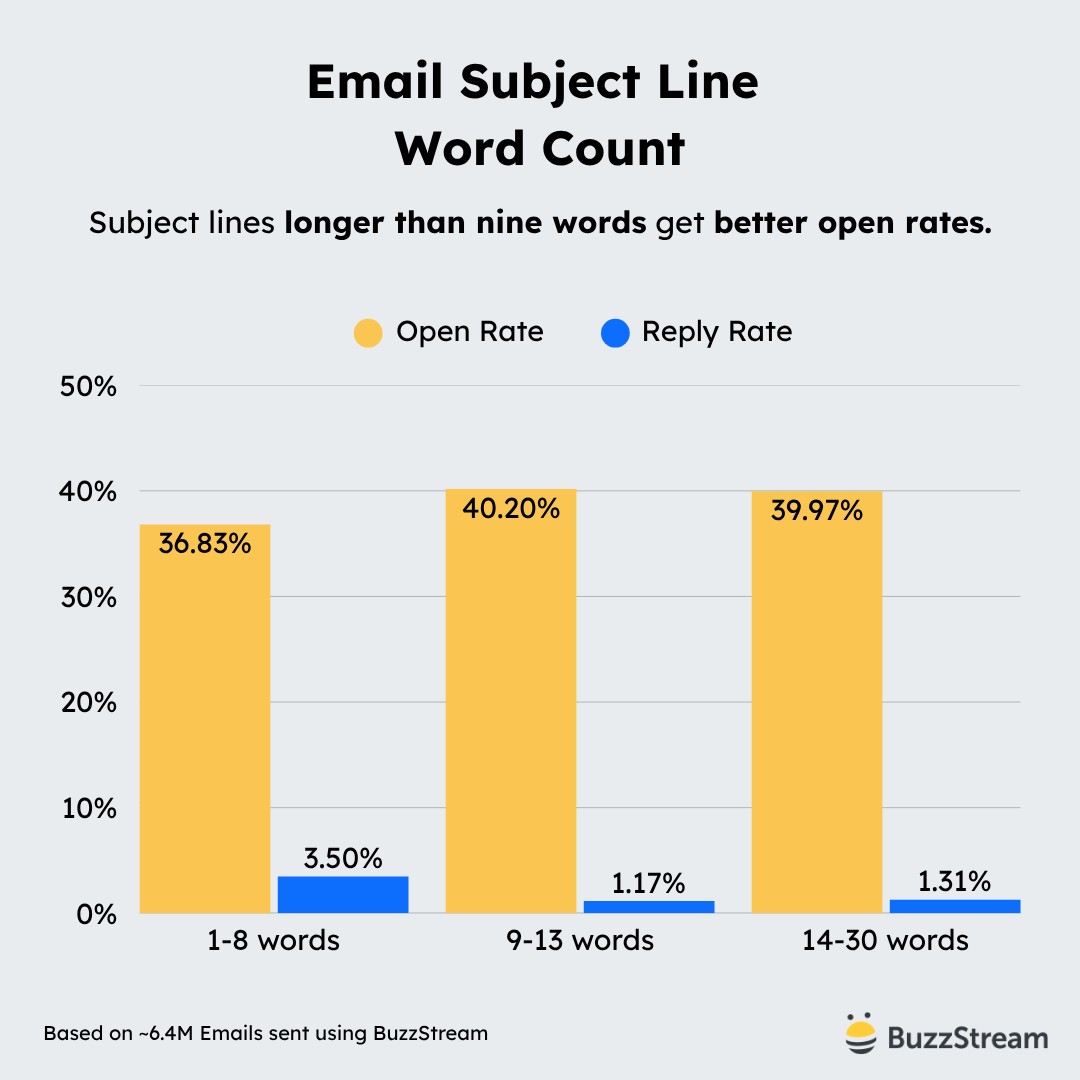
Those findings are not mutually exclusive: longer subject lines performed well overall, but only the first 40 or so characters may be visible in some inboxes, so front-loading the hook matters more than strictly limiting the total length.
Aim for roughly 40 characters when possible
Based on our email subject line length study, 40 characters is optimal across most platforms and browsers.
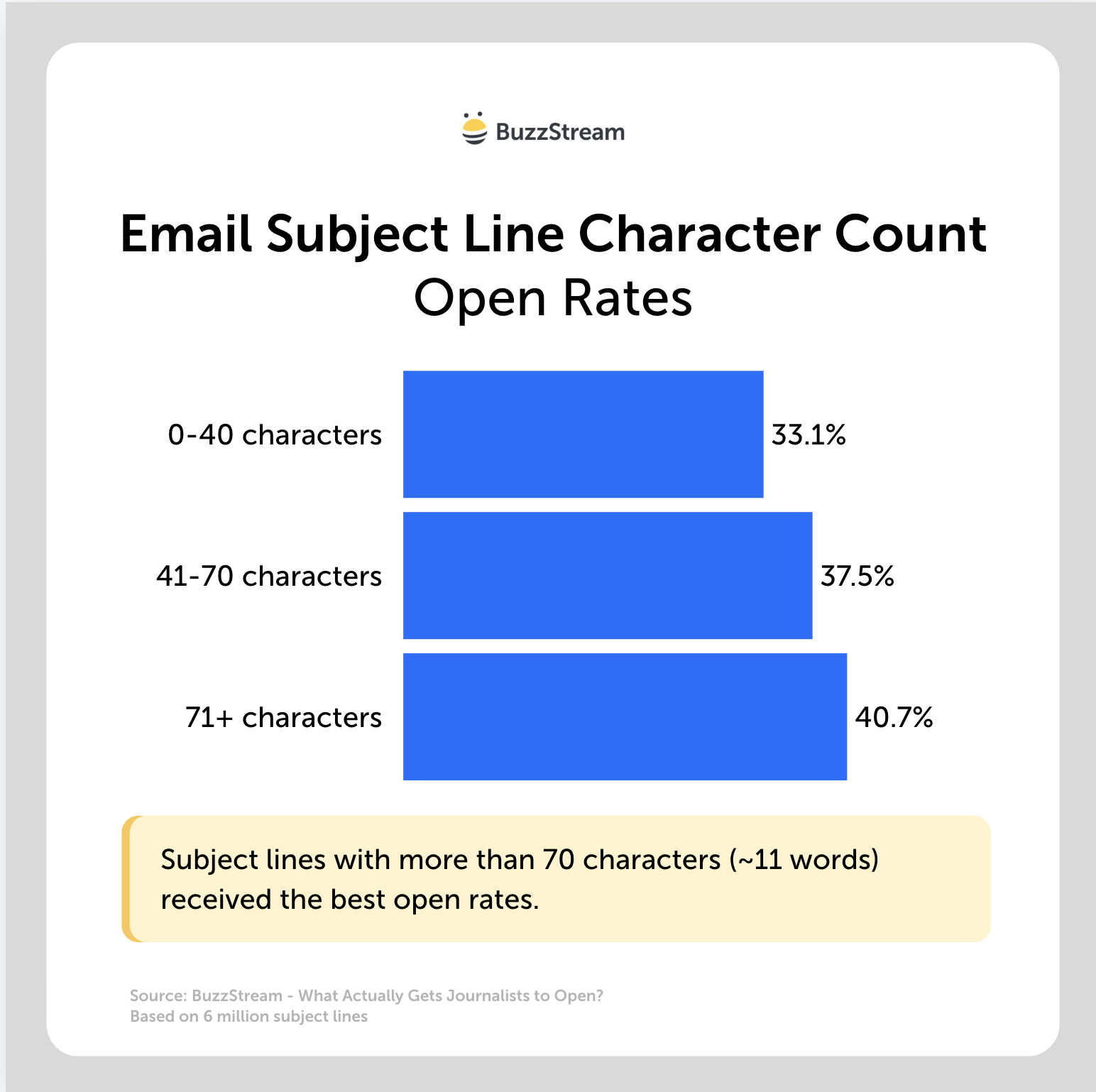
This is about 5.5 words, which may seem a bit small.
Ideally, you at least front-load the key terms.
Match their style
All that said, there is nothing more powerful than matching the subject line to how your target audience tends to write.
If you find a journalist tends to phrase their story headlines in a particular way, rewrite yours to match.
How to get started
- ✓ Choose what is most enticing and lead with it.
- ✓ Match the journalist’s style.
- ✓ Front-load the hook; write for desktop Gmail.
It’s All Connected
Here’s the whole thing in one line: a worse subject line on an authenticated, trusted domain, sent to a tight, relevant list, beats a perfect subject line on none of that.
But everything kind of overlaps and impacts the other stuff.
The subject line is where everyone starts because it’s the only part they can see, but you should ensure the technical stuff works first, then get into your outreach habits, and then your subject line.


 Check out the BuzzStream Podcast